Tuesday, 16 February 2016

Conversion Rate Optimization--Are You Shooting Yourself in the Foot?

Conversion rate optimization (CRO) has become the go-to solution for online marketing performance woes.


Astronomical cost-per-click? Improve your conversion rate and it won't matter anymore.


Unsure about your website design? Test all your ideas...and see what works!


Limited budget? You don't have to pay for more traffic--just get more conversions from the traffic you already have.


Whatever ails your online marketing, it can be fixed with a little CRO, right?


riiight


With all the case studies out there touting results like 41% increase in sales, 400% more conversions, or 600% increase in social shares, it's easy to believe that the ROI of your dreams is just a few tests away.


Unfortunately, conversion rate optimization isn't quite that simple. Simply putting together a test is not enough to guarantee you a better conversion rate--in fact, according to VWO, only 1 in 7 A/B tests produce a winning result!


So, does that mean CRO isn't all that it's cracked up to be?


Why CRO Fails


Conversion rate optimization is an awesome way to get more conversions out of your web traffic, but only if you approach it the right way.


At Disruptive, we've run thousands of tests, so we've seen our fair share of both amazing and not so amazing results.


After helping so many companies improve their conversion rate, it's become clear that CRO often falls short of its potential because companies set their tests up to fail.


Of course, nobody intentionally rigs their tests to fail, but most companies fall victim to one of four CRO traps:


  1. No overall strategy

  2. Goal confusion

  3. Ending early

  4. Ignoring traffic


Each of these traps will ruin a CRO test, so it's important to understand each trap and how to avoid it.


Fortunately, if you can steer clear of these test-killers, you can expect a much higher success rate--in our case, about 5/7 of our tests improve conversion rate (and we learn something from every test).


Let's dive into the details.


1. No Overall Strategy


If you want to be successful at CRO, you need to look at each test as part of a bigger whole.


In general, most companies tend to look at tests in isolation. They have an idea and run a test to see if it performs better.


If it works, they cheer and switch everything to their new idea. If it fails, they assume the idea was bad and toss it.


Unfortunately, this sort of approach doesn't teach you why a specific page was a success or a failure. That means you can't effectively use that test to guide future CRO efforts.


Remember the old George Santayana quote?


george-santayana


Okay, so that's not exactly how George's original quote went...but the point still holds. If you don't learn from your tests, you're never going to make much progress with CRO.


Documentation--the Secret to Successful CRO


A good testing strategy ensures you learn something from every test. To do that, you need great documentation.


The problem with a haphazard approach to testing is that your tests become very difficult to track. It doesn't take many tests before it is hard to remember what you were testing with which tests and why.


To really get the most out of your tests, it's best to write out your strategy in advance. For example, if you want to know if a new CTA improves your conversion rate, you might put together a spreadsheet like this:


cta-test-documentation


See how each test sets up the next test? You learn something from each iteration and then use that to guide your next test.


Plus, everything is thoroughly documented, so if anyone ever wonders why you made a certain choice, you've always got a handy reference!


A lot of testing tools will document your results, which is helpful, but if you don't document the thinking behind the test, the results won't do you much good.


What Approach is Best for Your Business?


Once you've got a plan in place for documenting and analyzing your testing results, you need to decide how you want to approach testing.


Depending on the needs and constraints of your business, your testing strategy will probably fall into one of two camps:


The Dramatic Change Approach

Big page changes often result in big conversion rate changes (good or bad), so this approach is great when you need results fast.


For example, if your conversion rate is so low that there's nowhere to go but up, this approach can be a lifesaver.


So, try an entirely new page setup or interface. Experiment with new content or an alternate color scheme. The goal is to compare a radically different design with your current setup to see if you can figure out what your audience is looking for.


The problem with this approach, however, is that you can only learn about your audience in the broadest of ways.


Sure, you know that X is better than Y, but that's about all you know.


That being said, this approach can be an effective range-finding strategy if you don't know where to start or have limited traffic. You can try a variety of very different designs and then refine your best performer.


The Minor Adjustment Approach

On the other hand, if your site is producing fairly well and you want to truly optimize things, it's better to start small and work your way up.


Making relatively small changes to your site allows you to be truly methodical about CRO.


Each change reveals something new about your target audience and how they interact with your site, which makes it easy to come up with new ideas for improving your conversion rate.


Success won't come all at once, but all those little adjustments add up to truly impressive results.


when-did-that-happen


This approach is particularly effective for websites with more that 6,000 site visits/month. If you have fewer visits than that, it's hard to get your site optimized within a reasonable time frame.


Either approach is valid, but it's important to decide which strategy fits your needs before you start testing. Otherwise, you'll have a hard time making any real progress.


2. Goal Confusion


A lot of companies think they are testing one thing when they are actually testing something else.


For example, if you're taking the dramatic change approach, there's nothing wrong with simultaneously testing a new call-to-action, hero shot and page layout.


The problem is, if your new page design performs better, you can't assume it was due to the new CTA.


Sure, it could have been the CTA, but it also might have been the new hero shot, the page layout or a combination of all three!


This is where things get sticky for a lot of businesses.


They ran the test because they had an idea for a new CTA, but along the way they decided, hey, while I'm running this test, I should also try a new hero shot...and a new layout...and...


i-better-take-them-all


By the time the test runs, they are testing a lot more than their CTA. However, since the original goal was to test the new CTA, most of the benefit is ascribed to the new CTA.


Even when companies recognize that they've muddied the waters by testing extra stuff, they still tend to attribute most of the gain to whichever change they "feel" contributed the most.


However, if you're judging test results based on gut instinct, you just wasted a lot of time (and possibly money) on acquiring data you aren't even using.


In other words, if you aren't clear about what you're testing, you shouldn't be testing.


3. Ending Early


Testing can be a bit of an emotional roller coaster.


Often, if your variant design is producing better results, it can be easy to get excited! On the other hand, if it starts performing worse than your original design, there's a natural inclination to cut your losses.


While it can be tempting to call a test early, remember, CRO is all about data, not emotion. No matter how thrilling or chilling your results seem to be, you need to wait until you have meaningful data.


How Confident are You?


Ultimately, test duration boils down to statistics--the more traffic you push through your tests, the more accurate your results will be.


To make sure you get enough data, you need to decide in advance how much data you need to make an informed decision.


Typically, you'll want to set your confidence level at 95%. That being said, for low traffic sites or pages, achieving 95% confidence can take a really long time (eg, 6-12 months).


If you are only sending a few visitors per day to your site, you may need to set your confidence at around 75-80%.


In this case, the risk of not being able to run tests is often bigger than the risk of picking the wrong page, so you'll have to find a way to balance speed and accuracy.


That being said, the only time I recommend shooting for anything lower than 95% confidence is when waiting to achieve 95% confidence means you are only running a test every few months.


Otherwise, if you're getting decent traffic, don't pull the trigger early.


A few extra days isn't going to cost you all that much and it will save you from a lot of potential frustration.


Believe me, it's no fun to jump the gun, pick a winner and then watch your conversion rate slowly crumble as statistics asserts itself.


How Much Traffic Do You Need?


To put it simply, the faster you can get to 95% confidence, the faster you can learn from your results and start the next test.


How fast you can get to 95% confidence, however, depends on how much traffic you can herd onto your page and how much of that traffic you are willing to risk on your test.


herding-cats


To decide how much traffic to include in your test, you need to look at your goals and how your page is performing.


If you are just starting out or you're thoroughly unhappy with your current performance, you might as well go all in. Send 50% of your traffic to your variant and 50% to your original.


A 50/50 approach like this is the best way to quickly get out of the conversion rate doldrums. It allows you to rapidly test a large number of iterations, which means you'll quickly get your conversion rate to a more acceptable level.


Once your page is converting at an acceptable rate (or if it's already converting well), the risk-benefit equation starts to change. At this point, if your variant turns out to be a lemon, you could lose a lot of conversions.


In this situation, I generally recommend sending only 25-40% of your traffic to a new variant. That way, you've lowered your risk without overly limiting your testing ability.


If you really want to be conservative, you can cut back traffic to your variants to less than 25%. However, doing so makes it difficult to make any real progress with your tests, so I rarely encourage that sort of approach.


Testing and Waiting Go Hand-in-Hand


At the end of the day, if you want great test results, you can't afford to pull the plug early. Impatience ruins CRO.


So, once you've picked your target confidence and decided how to split your traffic, it's time to find your happy place and get used to waiting.


4. Ignoring Traffic


Finally, one of the biggest mistakes companies make with CRO is to assume that CRO will solve their conversion rate problems.


Unfortunately, your website is only part of the conversion rate equation. If you're sending the wrong traffic to your site, even a perfect page won't produce the conversions you're looking for.


For example, after conducting over 2,000 AdWords audits, I discovered that 61% of PPC budgets are spent on search terms that never convert.


throwing-money-away


That's a problem no amount of CRO will fix.


So, if you really want to make your CRO efforts effective, you have to look at your entire online marketing strategy. Do you have the right traffic? Are you sending it to the right page? Is that page providing an optimal experience?


CRO is just one piece of the marketing puzzle--don't expect it to solve all your conversion rate woes.


Conclusion


Does CRO have the potential to dramatically improve the performance of your website?


Absolutely, but a lot of companies make simple mistakes that end up shooting their CRO efforts in the foot.


However, if you can avoid some of the most common CRO pitfalls and put a great strategy in place with clear goals, appropriate timelines and great traffic, you can expect to be writing your own case study in no time!


That's my two cents, now I want to hear yours! Have you seen CRO tests fall prey to any of these traps? Are there any other common CRO mistakes you'd add to this list?


About the Author: Jacob Baadsgaard is the CEO and fearless leader of Disruptive Advertising, an online marketing agency dedicated to using PPC advertising and website optimization to drive sales. His face is as big as his heart and he loves to help businesses achieve their online potential. Connect with him on LinkedIn or Twitter.


Monday, 15 February 2016

How to Take Full Advantage of Facebook's Custom Conversions

As you all [hopefully] know, the conversion pixel is completely being replaced by the Facebook pixel in the first half of 2016.


The Facebook pixel holds the power of the conversion pixel and the custom audience pixel in one holy grail. It's basically a more effective and efficient way for marketers and advertisers to track, optimize, and remarket.


If you haven't joined the bandwagon, now is the time to make the necessary switch for a peaceful mind. An added feature of the Facebook pixel is that we can now create custom conversions, whereas we were unable to do that with the conversions pixel, nor the custom audience pixel.


What Are Custom Conversions?


Custom conversions allow us to track and optimize actions on specific web pages, while bypassing the additional step of adding anything to the Facebook pixel code. Rather than adding a unique pixel for every page, with the new Facebook pixel it's only required to add the single Facebook pixel once, to every converting page of your site.


Custom conversions are perfect for when you're running a campaign with a website conversions objective, as it allows you to track specific users as they convert on a given web page. This way, you can chose to optimize for conversions, and Facebook will serve your ad to people who are most likely to complete the preferred action on your website. With implementing custom conversions, Facebook has a better ability to determine whether a user who visited your website ended up converting.


facebook-custom-conversion-setup


This shows amount of conversion traffic that resulted from a custom conversion on the "Purchase" page of a website. The fifth column displays the conversion traffic, which is the number of people who have converted.


How To Create Custom Conversions


The first and foremost step of creating a custom conversion is installing the Facebook pixel on your website. Once that's complete, sign into Facebook ads manager and click on "Tools". Select "Custom Conversions" from the drop down and click the "Create Custom Conversions".


facebook-tools-custom-conversions


create-custom-conversions-facebook


You'll have the option to "include traffic that meets the following":


  • URL Contains

  • URL Equals


url-contains-facebook


Select the most suitable option. For example, you can select a URL that equals www.celinemirzaian.com/facebook-advertising-news-subscription-thank-you/. Or you can use a URL that contains "/facebook-advertising-news-subscription-thank-you".


Basically, any web page that contains the Facebook pixel, so any web page that signifies a conversion. In this case, I would be tracking subscribers to my newsletter. If they hit my "thank you" page, they count as a subscriber, and therefore a conversion.

I would recommend using "URL Contains" in the case where your "thank you" page or "order confirmed" page has a dynamically generated URL. Some ecommerce websites will append a customer ID to the URL on their checkout and order confirmed pages, i.e., celinemirzaianclothing.com/order-confirmed?id=04548567438. In this case, you will want to select "URL contains" "/order-confirmed" because each different customer will have a difference exact URL.


create-a-custom-conversion


conversion-category


In the example I gave, my URL leads to a "thank you" page, so I would chose the "Complete Registration" category.


After you're done selecting a Rule and a Category, click "Next" and type in a name for your Custom Conversion. If applicable, you can set a conversion value. Click "Create" and voila! You can continue the same process and create a separate Custom Conversion for every lead magnet on your site.


custom-conversion-facebook-advertising


How To Track Custom Conversions


In order to track Custom Conversions, again we would click the "Tools" drop down and select "Pixels" rather than "Custom Conversions". After that, click "Create Conversion", and you'll be advised to choose a tracking method. You'll want to "Track Custom Conversions".


facebook-tools-pixels


tools-facebook-pixel


facebook-set-up-conversion-tracking


Instead of selecting a conversion to track, Facebook automatically tracks and reports the conversions that result from your ad given that you've selected the Facebook pixel for optimization.


How To Optimize Custom Conversions


At the ad set level of your website conversions campaign, select "choose a conversion event" and select any of the custom conversions you created. This automatically tells Facebook that you want to optimize for that specific action.


Branding a business online versus driving traffic and increasing conversions on your website are two separate objectives. Thankfully, Facebook's ad manager allows us to build campaigns based on specific objectives. If you're focused on building an online brand, you can choose the "Promote your Page" campaign objective. For the sake of this blog, since we're focused on the topic of custom conversions, you need to rely on the "Increase conversions on your website" objective. Whether you're an E-Commerce or a Non-profit organization, this method is helpful in driving traffic to your website.


facebook-choose-campaign-objective


Let's say you're an online clothing store, and you want to effectively promote your new spring collection. In order to raise brand awareness while at the same time driving conversions, you can create a carousel ad with images of three items of clothing, each linking to the appropriate pages on your website. You'll want to add a call to action in order to encourage people to "buy now" or "shop now". This is where the Facebook pixel and custom conversions come in handy. Install the Facebook pixel on each converting page of your website so that you can measure how many people clicked through from the carousel ad on Facebook and purchased your product.


Make sure custom conversions are set up so that Facebook can "optimize for conversions", and serve your ad to the people who are most likely to convert.


facebook-carousel-ad


The combination of multiple pixels into one is ultimately going to lead marketers to utilize their time effectively and efficiently. We no longer have to add a unique conversion pixel on each individual success page of a website. Instead, we can add a single Facebook pixel to each individual page. With custom conversions, marketers can track and optimize for website conversions without going through the time consuming process of adding anything to the Facebook pixel code. What's the added benefit? Facebook automatically tracks and optimizes custom conversions. If you're running multiple website conversion campaigns, now is the time to implement custom conversions.


About the Author: Celine Mirzaian is a paid social advertiser at Catalyst. Her keen interest in social media advertising combined with her passion for writing motivates her to seek what's up and coming in the paid social scene, and translate it into words to share with the rest of her fellow marketers. Check out her LinkedIn for more about Celine.


Content Strategy: A Development Guide

User engagement metrics, which measure what users do on your website and how they do it (such as time on page, session duration, bounce rate, and returning users), have become unofficial ranking signals with Google.


Gone are the days when posting a 400-word article with a 2% keyword density could boost a page's search rankings. Now, poor quality content has a far more negative impact on a site, causing it to drown in a sea of content that was created just for SEO purposes.


Yes, the way content is interacted with online is definitely on Google's radar, as shown by Google's recent patent filing. So, while creating a sound content marketing strategy is necessary to attract and retain users, it also improves a site's Google search rankings. Therefore, focus on producing quality content, and you will reap a boost in SERP rankings as a secondary benefit.


The key is to always strategize before producing any content. Don't just simply churn out content for content's sake. Once you start producing great content and your users engage with it and boost rankings at the same time, you'll understand why this is the far superior approach.


It isn't as hard as it sounds, either. The tips in this article will help you. Now, let's get started on the first step, which is to define your goals.

Define Your Goals


Great content is created for a specific purpose, and this purpose needs to be defined. Ask yourself if you are creating content to boost brand awareness, generate leads, convert users, attract past customers, improve search ranking results, or something else altogether.


Once you have clearly defined your goals, you need to determine if a content strategy is in fact the best way to achieve them. Don't assume content is the best option in every situation. For instance, content might be of little use in converting users at the bottom of the sales funnel; however, it could be invaluable in boosting brand awareness and lead generation.


Different segments of the sales funnel warrant different types of content. So, you will need to decide what content is most appropriate for a person to receive at a given time. That way, you will have the right conversation with the right person at the right time.


HubSpot provides some useful information on the types of content that are needed in different parts of the sales funnel. The company divides the sales funnel into three key areas, and then lists the appropriate content asset types for each in the graphic below:


content-need-in-sales-funnel


Image Source


Research Your Audience


Your content strategy can be effective when you know who your audience is. Valuable information can be gleaned by checking what types of sites your prospects are already visiting, which content they engage with, and which social media platforms they share content on. This can be done by enabling Google Demographics and Interests for the types of sites prospects engage with and Google Analytics for the content they engage with, and by reviewing which social platforms are more popular for sharing on content pages.


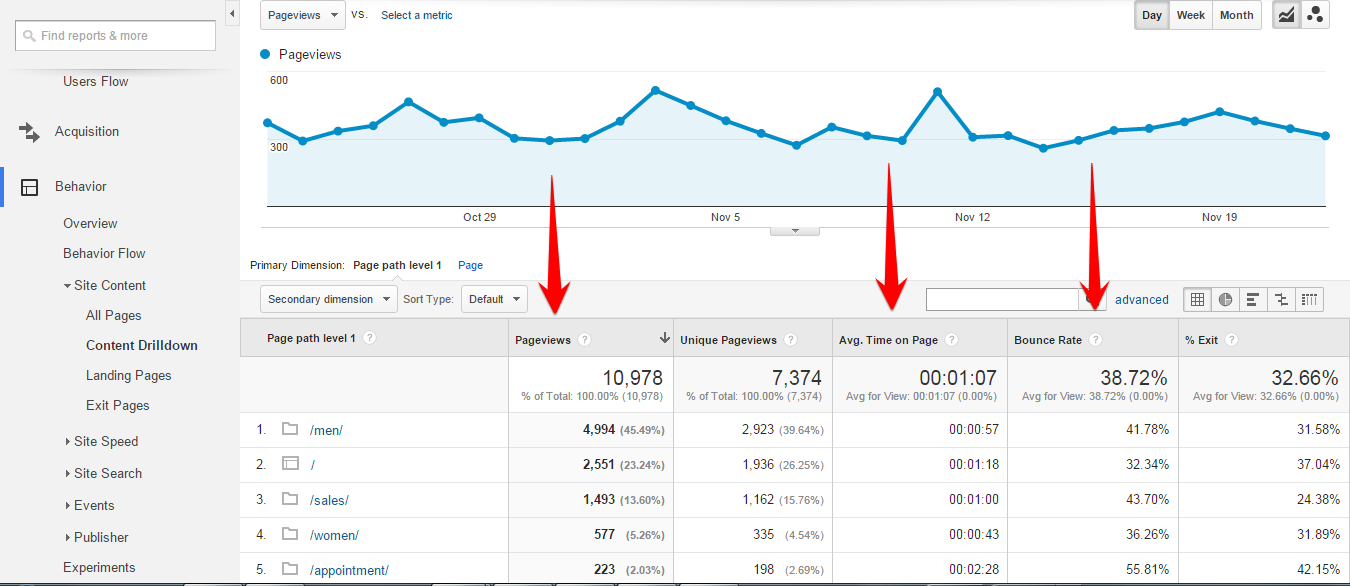
Delve into Google Analytics to determine which content is producing the best results. Click on Behavior>Site Content>Content Drilldown. To find the best results, sort by different factors such as Average Time on Page, Bounce Rate, and Pageviews. With this information, create content that is targeted to the user, rather than content that you want to read. Your goals for creating this content are to increase Average Time on Page, decrease Bounce Rate, and increase Pageviews.


Focus on Your Niche


It's a sad fact that the Internet is full of content that shouldn't even exist. This content either already exists elsewhere and is simply reposted or doesn't provide any real value. Most people don't see 99% of this useless content because it doesn't appear anywhere near the top of SERPs.


To avoid having your content lost in that pack, create content that stands out, is unique, has a distinct voice, and, most important, offers genuine value to readers.


The more specific you are and the more you focus on your niche, the greater your chances of establishing yourself as an authority in your field, whether your readers are looking for information or entertainment.


One business that has done this successfully is the rum brand Sailor Jerry (although this example isn't specifically about content marketing). The company hosted a marketing event in Brooklyn at which they gave away a free shot of Sailor Jerry to every fan who was willing to get inked permanently with a Sailor Jerry tattoo. This created a lot of brand exposure for Sailor Jerry, but the real benefit was creating a stronger link with its loyal fan base.


While most of the fans of your brand probably aren't about to tattoo your logo on their bodies any time soon, there are nonetheless important lessons to learn here about building a strong connection with a focused and loyal user base, which is usually more effective than having superficial links to a larger base that is more general in nature.


Measure Your Results


Measuring the results of your content marketing efforts is one of the most important aspects of developing an effective content strategy. Churning out content without analyzing your user feedback is akin to having a phone conversation on mute. You need to know what your audience liked as well as what they didn't like, and why. Here are some of the most important metrics to understand.


Consumption Metrics


This is the first layer of information you can gather when people view your content. As previously mentioned, and as shown in the screenshot below, you get this data from Google Analytics by clicking on Behavior>Site Content>Content Drilldown. You can sort by different factors such as Average Time on Page, Bounce Rate, and Pageviews.


With this data, you can find answers to questions like these: Did you craft a blog post that brought on a huge spike in traffic? Did your users spend more time on a particular piece or genre of content? Did a piece of content garner a large number of comments or shares on social media?


google-analytics-consumption-metrics


Social Sharing Metrics


Sharing on platforms like social media can be a great metric for judging how engaged your audience is. Ask yourself what types of content are being shared, who is sharing, which platforms are being used, and, most important, what content is converting. Below are the steps for how to find what content is converting:


  1. Log into Google Analytics.

  2. Click on Acquisition>Social>Overview.


acquisition-social-overview-google-analytics


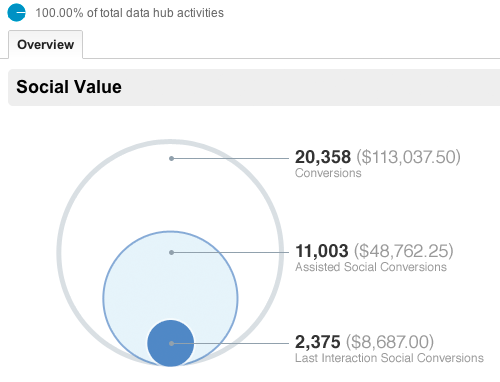
Then you will have a report similar to the one below (assuming you have goals set up):


social-value-google-analytics


Here, you have three important metrics:


Conversions: This shows you the total number and amount of conversions. They are from every traffic source, not only social.


Assisted Social Conversions: In order for an assisted social conversion to register, a visitor must have visited the social media site once, though they may have used another traffic source before the last part of the conversion.


Last Interaction Social Conversions: Visitors are attributed to this group if they came from social media and completed the assigned goal in the same session.


Once you have this data, it will yield insights into the style of content that needs to be created in order to get conversions. Also, you will be able to decipher which social media platforms are working best. (Take into account that some niches encourage sharing more than others, so compare your performance with those of competitors with a similar user base.)


Lead Metrics


If your content is part of a sales funnel, ask yourself which part of the sales funnel you are creating the content for. Content needs to be tailored to the specific audience at each segment of a sales funnel.


Your content could be either attracting or leaking leads, so monitor its performance and identify areas that could be improved to stop users from dropping out of the sales funnel and areas that could generate new leads. The quickest and easiest way to track leads is to use goals in Google Analytics.


The easiest type of goal to set up is a URL destination goal. Here are the steps:


  1. Log into Google Analytics.

  2. Click on Conversions>Goals>Goal URLs.

  3. goal-urls-google-analytics


  4. Then click the "Set up goals" button.

  5. set-up-goals-google-analytics


  6. Then click the "+NEW GOAL" button.

  7. new-goal-google-analytics


  8. Then select Template (shown in step 7 below).

  9. Then type in a description for your goal (shown in step 7 below).

  10. Then select Destination, and click the "Continue" button.

  11. goal-destination-google-analytics


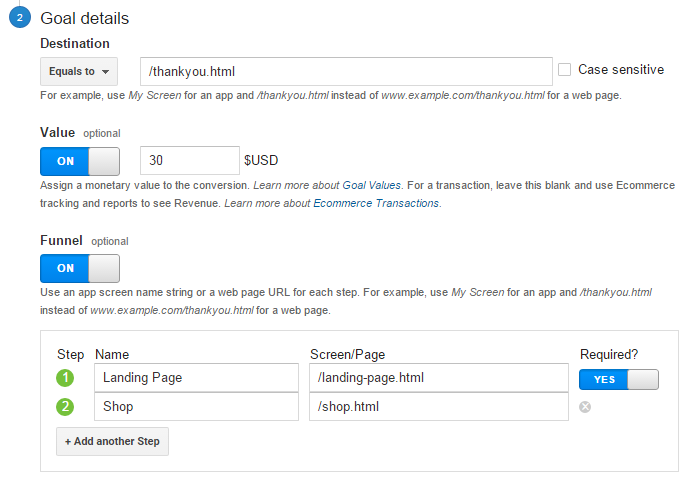
  12. In goal details, you need to add the URL of the goal you want to track. The whole URL is not needed, just the final path. For example, to track www.example.com/thankyou.html, input only /thankyou.html.

    Here, you will have two optional details:


    Value: It is possible to assign a value to the goal. For example, if you are selling a product for a specific price, you can add it here.


    Funnel: It is also possible to track a specific part of the sales funnel by adding it to the goal. For example, if you need to know how many people visit www.example.com/pricing.html before completing a goal, then add /pricing.html into the field.


  13. goal-details-google-analytics


  14. Then click save and that's it.

  15. To view goals once they are set up click Conversions>Goals>Goal URLs


goal-urls-google-analytics


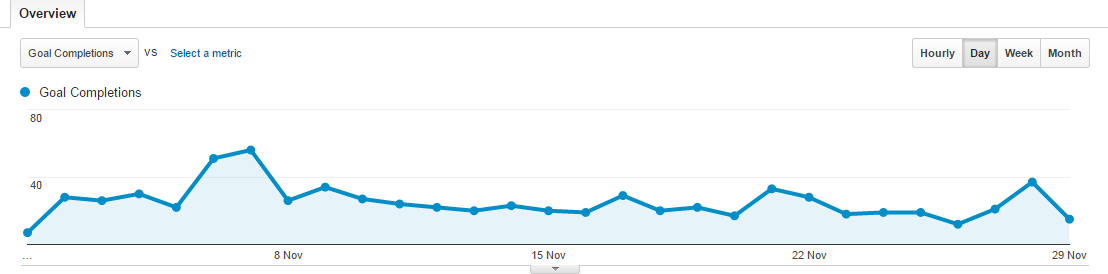
You should see something like this:


goal-completions-google-analytics


Sales Metrics


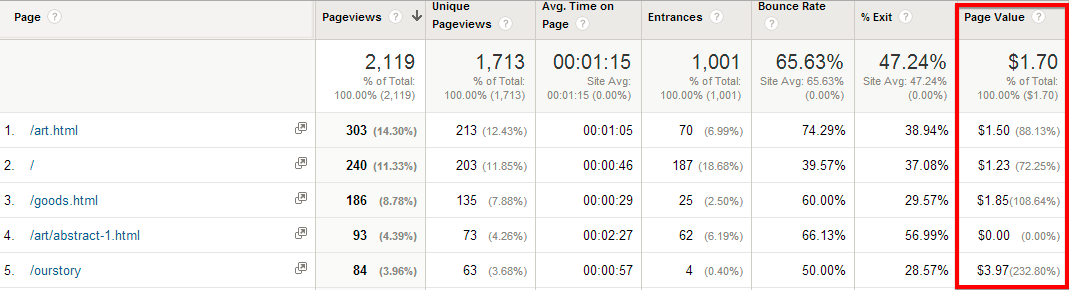
For most businesses, content generation ultimately should boost revenue. Therefore, if your content strategy is revenue-based, you will need to find ways to measure the amount of revenue your content marketing has generated.


Below are the steps for how to find the amount of revenue your content has generated:


  1. Log into Google Analytics.

  2. Click on Behavior>Site Content>All Pages.


audience-all-pages-google-analytics


You should have something similar to this:


page-value-google-analytics


This will allow you to assign a value to a piece of content. If the content isn't performing as needed, then check out this great article by Neil Patel on how to increase engagement with content.


Now, here is a picture that visually represents the four content marketing strategy metrics outlined above:


content-marketing-metrics


Listen to Your Customers


While data analysis can be an immensely useful tool, it gives you only black and white figures on a spectrum that encompasses a lot of subtleties. Access the rest of that spectrum by really listening to your customers. Your customers need to know they are being heard on social media, so ask them for feedback and suggestions.


Also speak to other members of your staff to get a better understanding of the needs of your customers. Reaching out to your customers and responding to their feedback enables you to gather valuable data, and it also shows them that their opinion matters.


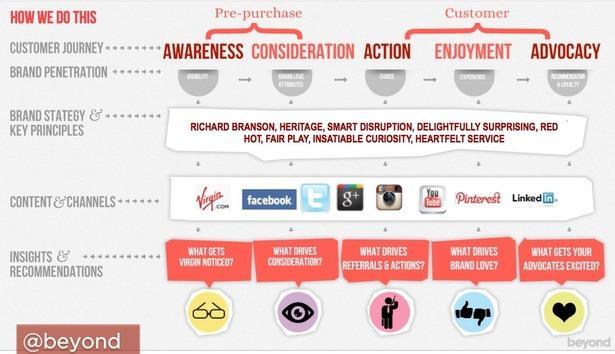
Virgin.com provided an excellent case study by showing how they utilized big data. They incorporated search terms used on the web, people being followed on social media platforms, and views and interests expressed online.


Using the data below, they dug deep and incorporated it into their communications, successfully giving audiences the right message at the appropriate parts of the customer journey. Find out more here.


Here is a flowchart of the results:


prepurchase-customer-jouney


Amplify Your Content


A sound content strategy and targeted content creation make up only the first part of the equation. The final part is amplification of the content.


To amplify your content, determine the places your audience is frequenting online, and then publish on those channels to reach them. You'll need to think strategically in order to identify all the resources available to you and then harness the power of employees, customers, and influencers to really amplify your content.


Conclusion


As you can see, creating a great content strategy isn't rocket science, but it can be quite challenging to implement. Expect to encounter roadblocks and go through lots of trial and error. Once you have a recipe for success, though, all you'll have to do is rinse and repeat to see the kind of audience growth you've always dreamed of.


About the Author: Brie Moreau is a Digital Marketing Analyst for DigitalAdvertisingWorks. DigitalAdvertisingWorks specializes in all areas of search engine optimization, has clients in many industries, and operates worldwide.